Dynamics CRM 2011 Dashboards
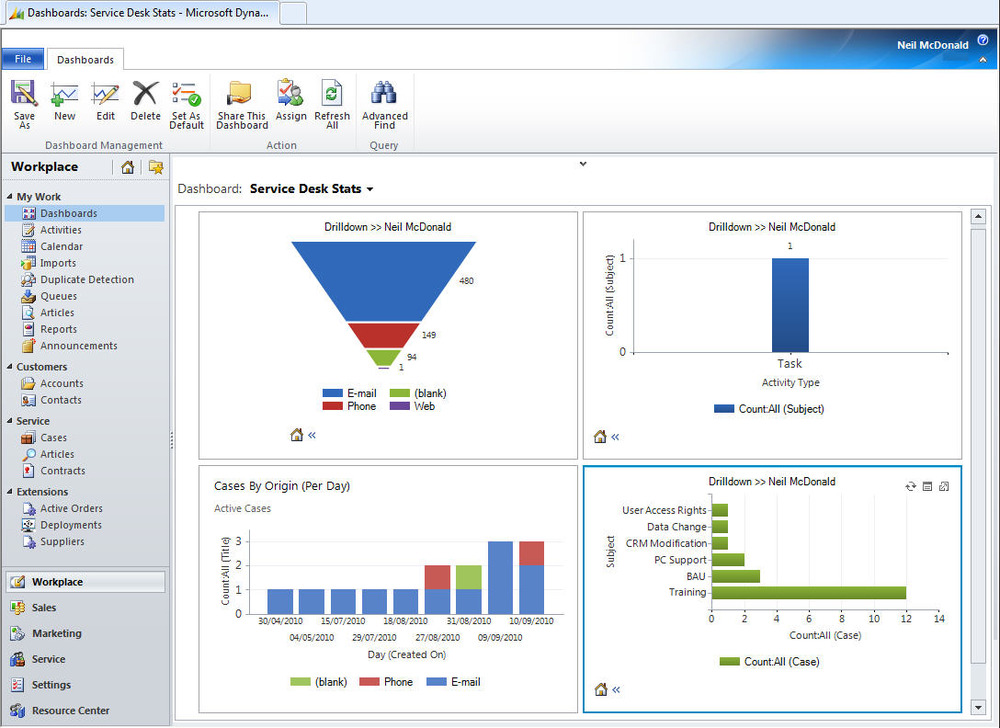
The new real-time dashboards in Microsoft Dynamics CRM 2011, finally brings Dynamics CRM reporting in line with the competition.
Dashboards are likely to be the new favourite feature among business and sales users who enjoy looking at pretty charts with lines pointing the right way. More importantly, they offer a powerful way to view and analyse business performance based on real-time statistics. Read the rest of this entry »
Dynamics CRM 2011 beta setup
I’ve created a short video guide for setting up the Dynamics CRM 2011 on-premise beta. I installed all of the services on to the same virtual machine, so some of the things done will not reflect best practices. The whole installation (excluding Windows setup and updates) took took just over an hour but I’ve tried to cut as many of the progress bars as possible.
Before I started recording, I installed Windows Server 2008 with SP2 and all available updates. I also turned off UAC and the Windows firewall.
If the video below does not work, please try here. Be sure to watch it in full screen HD, otherwise the quality is not great.
CRM 2011 Beta
The official Dynamics CRM 2011 beta website has just been put live. Head on over to http://offers.crmchoice.com/CRM2011Beta-Landing and register for the official software download and beta forums.
There are also a lot of demo videos to give you an overview of the new features. I’m really looking forward to the new dashboards and can’t wait to get started with the beta!
Edit: The download page is here
Update Rollup 12 Podcast
Well this is a first. Microsoft have put together a podcast regarding update rollup 12. It includes an insight into the internal Microsoft process of putting an update together and update rollout tips. You can listen to it on Blog Talk Radio.
Unresolved email clear out
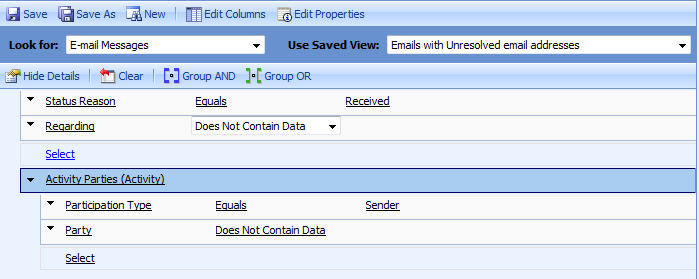
I find that our CRM queues receive a lot of spam and I was looking for an easy way to clear this out. The easiest method I’ve found is deleting emails with unresolved senders which do not have the ‘regarding’ set. The Advanced Find above returns most of the spam received and makes it very simple to clear it all out.
Read the rest of this entry »
Send mass mailings using templates
Campaigns with Dynamics CRM are a great way to communicate with your customers and leads, but for some reason, Microsoft left out the option of sending campaign emails using email templates. There is, as always, a workaround for this. You can send the email template via an on demand workflow against a list of contacts.
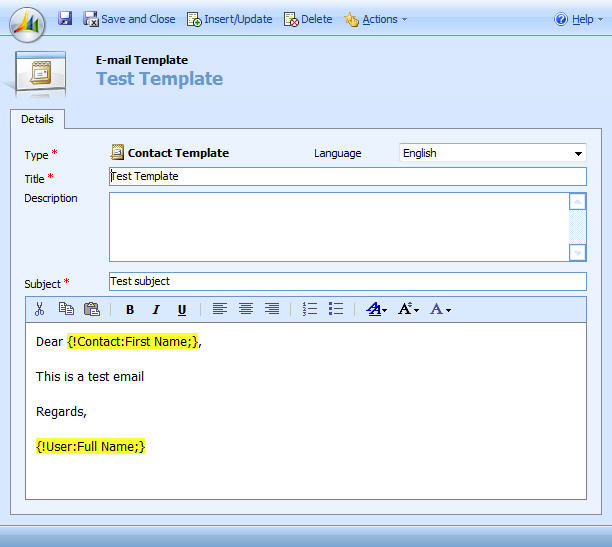
First of all create your email template for the entity you would like to send the email to. In this case, I am going to use the Contact entity.
Update Rollup 12 for Dynamics CRM 4
Microsoft have released Update Rollup 12 for Dynamics CRM 4. As usual it contains the normal batch of bug fixes, but importantly, it also adds rule deployment wizard support for Exchange 2010. Read more about the update here
Free CRM 4 HTML Email Campaigns
Dynamics CRM 4 does not come with the ability to compose HTML emails. This limits what can be done via marketing campaigns and email templates. There are companies who have created various addons and accelerators for this. Most give marketing stats and pretty graphs, but they are very expensive and do more than you need in many cases.
If you are looking to just send out a HTML email and do not care about click through rates etc then this free option should help. You’ll need a HTML editor and a web site where you can host a web page and some images.
First of all, you need to create your HTML email in you HTML editor.

Dynamics CRM spell checking
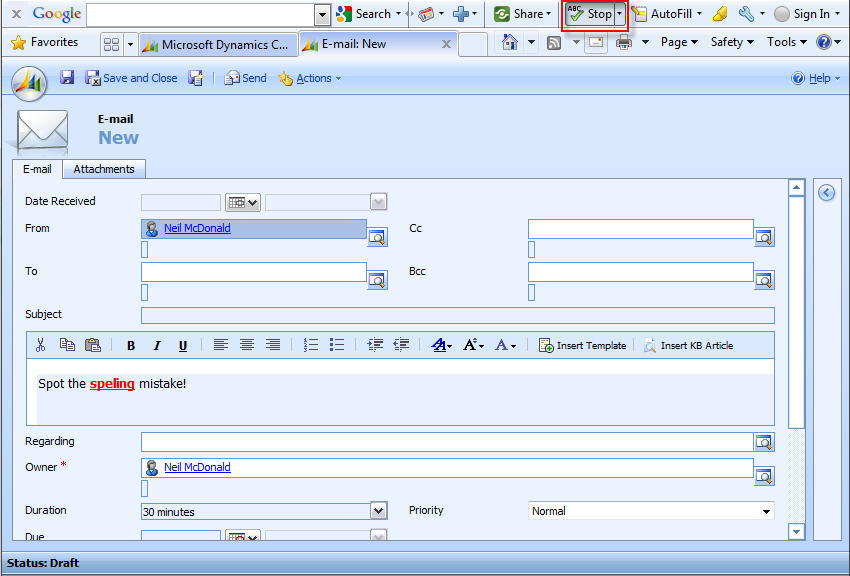
Sending important emails containing spelling errors is unprofessional. Unfortunately, Dynamics CRM does not come with spell check functionality.
The Google toolbar includes a built in spell checker which, when combined with tabbed browsing, makes spell checking CRM emails easy.You’ll need to follow my guide to enable tabbed browsing and also install the Google toolbar. Once it’s installed, just click on the spell check button when writing an email and any spelling mistakes will be highlighted and suggestions given.
There are a variety of accelerators that can add this functionality but I have yet to find one for free.
Thanks to Craig for the suggestion!
Checking SQL table sizes
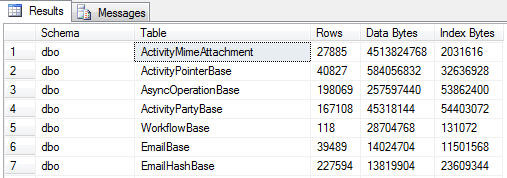
I wanted a way to find which tables were using the most storage in my SQL databases. The stored procedure sp_spaceused will show this data for a single table, but I wanted to view every table at once. The below SQL query will run against any SQL 2005 database and show you it’s table sizes in descending order. As expected, the ActivityMimeAttachment table in my CRM database was pretty huge!
SELECT sys.schemas.[name] AS [Schema],
sys.tables.name AS [Table],
COALESCE([Row Count].[Count], 0) AS [Rows],COALESCE(8192 * [Data Pages].[Count],0) AS [Data Bytes],
COALESCE(8192 * [Index Pages].[Count],0) AS [Index Bytes]
FROM sys.tables
INNER JOIN sys.schemas ON sys.schemas.schema_id = sys.tables.schema_id
LEFT OUTER JOIN (SELECT object_id,SUM(rows) AS [Count]
FROM sys.partitions
WHERE index_id < 2
GROUP BY object_id) AS [Row Count] ON [Row Count].object_id = sys.tables.object_id
LEFT OUTER JOIN (SELECT sys.indexes.object_id,SUM(CASE WHEN a.type <> 1
THEN a.used_pages
WHEN p.index_id < 2
THEN a.data_pages
ELSE 0 END) AS [Count]
FROM sys.indexes
INNER JOIN sys.partitions AS p ON p.object_id = sys.indexes.object_id
AND p.index_id = sys.indexes.index_id
INNER JOIN sys.allocation_units AS a ON a.container_id = p.partition_id
GROUP BY sys.indexes.object_id) AS [Data Pages] ON [Data Pages].object_id = sys.tables.object_id
LEFT OUTER JOIN (SELECT sys.indexes.object_id,SUM(a.used_pages - CASE
WHEN a.type <> 1
THEN a.used_pages
WHEN p.index_id < 2
THEN a.data_pages
ELSE 0 END) AS [Count]
FROM sys.indexes
INNER JOIN sys.partitions AS p ON p.object_id = sys.indexes.object_id
AND p.index_id = sys.indexes.index_id
INNER JOIN sys.allocation_units AS a ON a.container_id = p.partition_id
GROUP BY sys.indexes.object_id) AS [Index Pages] ON [Index Pages].object_id = sys.tables.object_id
ORDER BY [Data Bytes] desc
 Neil McDonald's Dynamics 365 and Power Platform Blog