Archive for the ‘Misc’ Category
Checking SQL table sizes
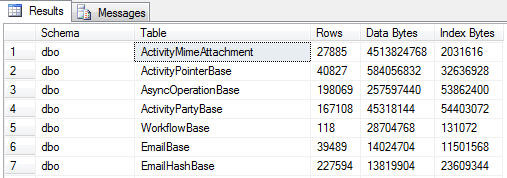
I wanted a way to find which tables were using the most storage in my SQL databases. The stored procedure sp_spaceused will show this data for a single table, but I wanted to view every table at once. The below SQL query will run against any SQL 2005 database and show you it’s table sizes in descending order. As expected, the ActivityMimeAttachment table in my CRM database was pretty huge!
SELECT sys.schemas.[name] AS [Schema],
sys.tables.name AS [Table],
COALESCE([Row Count].[Count], 0) AS [Rows],COALESCE(8192 * [Data Pages].[Count],0) AS [Data Bytes],
COALESCE(8192 * [Index Pages].[Count],0) AS [Index Bytes]
FROM sys.tables
INNER JOIN sys.schemas ON sys.schemas.schema_id = sys.tables.schema_id
LEFT OUTER JOIN (SELECT object_id,SUM(rows) AS [Count]
FROM sys.partitions
WHERE index_id < 2
GROUP BY object_id) AS [Row Count] ON [Row Count].object_id = sys.tables.object_id
LEFT OUTER JOIN (SELECT sys.indexes.object_id,SUM(CASE WHEN a.type <> 1
THEN a.used_pages
WHEN p.index_id < 2
THEN a.data_pages
ELSE 0 END) AS [Count]
FROM sys.indexes
INNER JOIN sys.partitions AS p ON p.object_id = sys.indexes.object_id
AND p.index_id = sys.indexes.index_id
INNER JOIN sys.allocation_units AS a ON a.container_id = p.partition_id
GROUP BY sys.indexes.object_id) AS [Data Pages] ON [Data Pages].object_id = sys.tables.object_id
LEFT OUTER JOIN (SELECT sys.indexes.object_id,SUM(a.used_pages - CASE
WHEN a.type <> 1
THEN a.used_pages
WHEN p.index_id < 2
THEN a.data_pages
ELSE 0 END) AS [Count]
FROM sys.indexes
INNER JOIN sys.partitions AS p ON p.object_id = sys.indexes.object_id
AND p.index_id = sys.indexes.index_id
INNER JOIN sys.allocation_units AS a ON a.container_id = p.partition_id
GROUP BY sys.indexes.object_id) AS [Index Pages] ON [Index Pages].object_id = sys.tables.object_id
ORDER BY [Data Bytes] desc
CRM pop-ups in new tabs

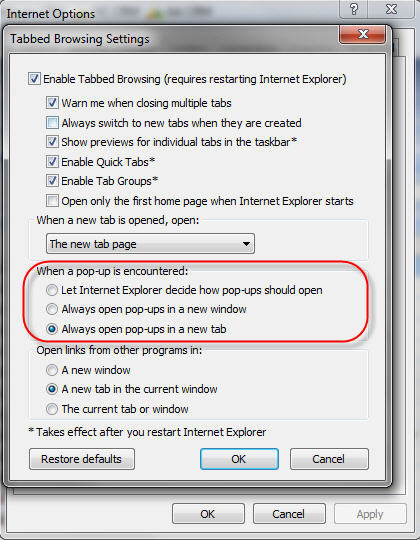
With Internet Explorer, you have the option to open all pop ups in a new tab rather than a new window. I find this works great for CRM, particularly when working inside different organisations. I can keep my development organisation and all pop ups in one IE instance and my live instance in another. You can find the option to do this under IEToolsInternet Options and click the Settings button under the Tabs section on the General tab.
CRM iPhone homescreen icon
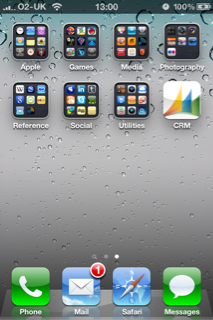
I sometimes like to check up on cases and activities from my iPhone and have a homescreen shortcut to our CRM mobile express site. By default, Dynamics CRM does not have an iPhone icon, so I created one for myself here. If you’d like to use it, download it, save it as apple-touch-icon.png and drop it into your CRM web root folder (mine is c:inetpubwwwroot). When you next navigate to your CRM mobile express site, add it to your homecreen and it will display a much prettier icon.
 /
/ Neil McDonald's Dynamics 365 and Power Platform Blog